$0Forever Free
- Import and Play All Your Games
- Artwork & Metadata
- Emulators & Achievements
Start with the free version and upgrade whenever you’re ready.
 Lifetime
Already have a license?Renew or Upgrade to LifetimeLost Your License?
Having trouble with payments? Contact Us and
we will resolve your issue in an excessively expedient manner.
Your license never expires, only its free updates do.
Get every Premium feature with one payment and no subscription.
Every new feature and fix lands on your PC the moment it ships.
After the year LaunchBox keeps working with everything you have. Renew updates any time, or upgrade to Lifetime.
Here’s everything each plan includes.
Select preferred platform
Select preferred platform
$0 / Free Forever
Download for FreeDownload for WindowsOwn it Forever,
Update for a Year
LifetimeOwn it Forever,
Update Forever!
| Feature | Free | Regular | Lifetime |
|---|---|---|---|
| Unlimited Game Imports | Included | Included | Included |
| Extensive Import OptionsImport from Steam, GOG or Epic, or scan a folder of ROMs and DOS games. | Included | Included | Included |
| Automated Game Imports | Included | Included | Included |
| Storefront Management | Included | Included | Included |
| Playlist SupportGroup games from any platform into playlists of your own. | Included | Included | Included |
| File Management Tools | Included | Included | Included |
| Game AuditingSpot games with missing artwork, videos or details across your library. | Included | Included | Included |
| Custom Fields | Not included | Included | Included |
| Feature | Free | Regular | Lifetime |
|---|---|---|---|
| Media Downloading | Included | Included | Included |
| Comprehensive Suite of Editing ToolsEdit any field or point a game at your own artwork. Nothing is locked to the database. | Included | Included | Included |
| Image Pack Tools | Included | Included | Included |
| EmuMovies Integration | Included | Included | Included |
| Platform IconsIcons for your platforms are included. Customizing them is part of Premium. | Included | Included | Included |
| Music Support | Included | Included | Included |
| Game ManualsOpen manuals, guides and old magazines right inside LaunchBox. | Included | Included | Included |
| Game Additional Documentation | Included | Included | Included |
| Video Playback Support | Not included | Included | Included |
| Feature | Free | Regular | Lifetime |
|---|---|---|---|
| Emulator Management | Included | Included | Included |
| Automated Emulator DownloadsLaunchBox suggests the right emulator, downloads it and sets it up for you. | Included | Included | Included |
| Advanced Scripting Support | Included | Included | Included |
| Feature | Free | Regular | Lifetime |
|---|---|---|---|
| Game Statistic Syncing | Included | Included | Included |
| Play Time TrackingPlay time and progress sync between your installs, plus a history of play sessions. | Included | Included | Included |
| Steam Achievement Support | Included | Included | Included |
| GOG Achievement Support | Included | Included | Included |
| RetroAchievement Support | Included | Included | Included |
| MAME High Score Leaderboards | Included | Included | Included |
| Feature | Free | Regular | Lifetime |
|---|---|---|---|
| Controller Support | Included | Included | Included |
| LED Blinky Integration | Included | Included | Included |
| Controller Automation | Not included | Included | Included |
| Feature | Free | Regular | Lifetime |
|---|---|---|---|
| Custom Theme Support | Not included | Included | Included |
| Custom Colors | Not included | Included | Included |
| Custom Fonts | Not included | Included | Included |
| Customize Platform Icons | Not included | Included | Included |
| Advanced Visual Adjustments | Not included | Included | Included |
| Badges | Not included | Included | Included |
| Feature | Free | Regular | Lifetime |
|---|---|---|---|
| Big Box | 30 min trial | Included | Included |
| Pause Screens | Not included | Included | Included |
| Startup/Shutdown Screens | Not included | Included | Included |
| Marquee Second Screen Support | Not included | Included | Included |
| Platform Theme Video Downloader | Not included | Included | Included |
| 3D Models | Not included | Included | Included |
| Feature | Free | Regular | Lifetime |
|---|---|---|---|
| Premium Updates | Not included | 1 Year | Lifetime |
Everything in Free, plus the features below.
Big Box turns your PC into a console: a full-screen interface made for the TV, the couch and a gamepad.
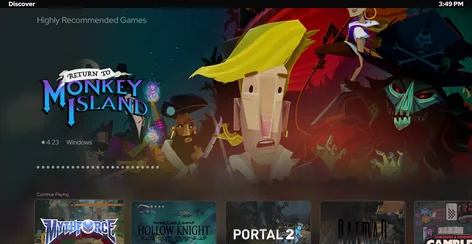
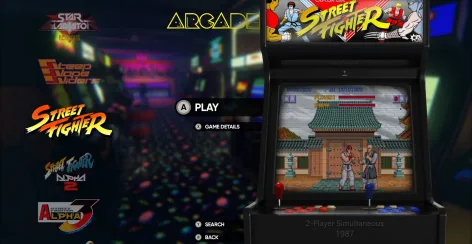
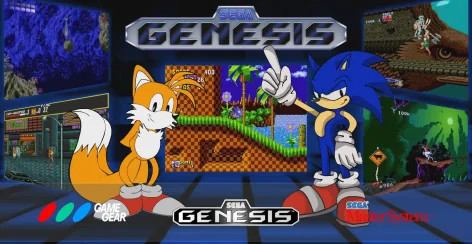
Pick a community theme or build your own, down to colors, fonts and spacing.
Built for cabinets, gamepads and second screens, so you can leave the keyboard behind.
 Hold
Video playback in your library and custom fields for the details you care about.


New Features Land All the Time
See the Changelog for WindowsMany additional options for your convenience.
There is no complicated installation process required to upgrade to LaunchBox Premium for Windows. Simply copy the license file you receive into your LaunchBox folder, and your instance of LaunchBox will take care of the rest the next time it starts.
There is no data loss, no library corruption, no errors or bug reports, and no headaches.
Your LaunchBox Premium for Windows License is DRM-free, which means that you can deploy it to as many personal computers as you wish.
We believe the time and money spent fighting piracy is better spent adding new features and fixing bugs. And paying users don't deserve to be inconvenienced by DRM. Take that, society.
 My Computer01Your Computer03My Computer02My Computer04My Computer05
Everything you might want to know before you buy.
No. You pay once and the license is yours forever. A Regular license includes a year of updates; after that LaunchBox keeps working, and you can renew updates whenever you like. A Lifetime license includes updates for life.
Forever. No Really! Your Regular License unlocks all the premium features and gives you a year of updates. After that, you can keep using LaunchBox on any version released before your year was up.
Regular: Full premium access + 1 year of updates. Perfect for starting your LaunchBox premium adventure!
Lifetime: Full premium access + updates for life! This is for true LaunchBox enthusiasts who want to join us on the long haul.
Absolutely! Renew your Regular License for another year of updates, or upgrade to Lifetime License at a sweet discount. Check out the links below for all the details.
Unfortunately, no. However, if there's a really good reason you need to update your license info, use our contact form and they might be able to help.
As many as you own! Our DRM-free licenses let you activate LaunchBox on any Windows or Android device you personally own (Windows licenses work on Windows devices, Android licenses work on Android devices).
Yes! The free version of LaunchBox for Windows comes with an unlimited free trial of Big Box, in 30-minute sessions. Experience the awesomeness (minus launching games or changing themes) and see if it's right for you before purchasing Premium.
We offer a lot for free! LaunchBox itself is free, and the Big Box trial lets you try before you buy. However, if you do need a refund within 14 days of purchase, we've got you covered.
No worries! Use our handy-dandy lost license form.
We've got your back!
Purchase, license, or account issues? Use our contact form.
App crashed? We've got the crash report already. Want to help us squash the bug? Click the link in the report to submit a ticket with details.
User issues? Our awesome community forum has the answers.
Didn't Find What You Were Looking For?
Visit Help & Support
